Project Management & Ticketing System — Hamahang

Hamahang plans
Three plans — Start, Pro and Elite — and each plan includes everything in the plan below it. Choose the plan that fits your business and request a demo of that plan.
- Up to 15 users
- Project and task management
- Ticketing system
- Calendar and reminders
- Files and attachments
- Progress reports
- Mobile app
- Support and updates
- Up to 50 users
- Everything in Start
- Team messenger
- Internal calls and meetings
- Kanban and Gantt boards
- Dashboards and reports
- Notification automation
- Priority support
- Unlimited users
- Everything in Pro
- Customer portal
- Custom workflows
- Organizational access levels
- API and integrations
- Service level agreement (SLA)
- Deployment and training
For pricing and a free consultation tailored to your needs, request a demo of your preferred plan using the form at the bottom of this page.
About Hamahang
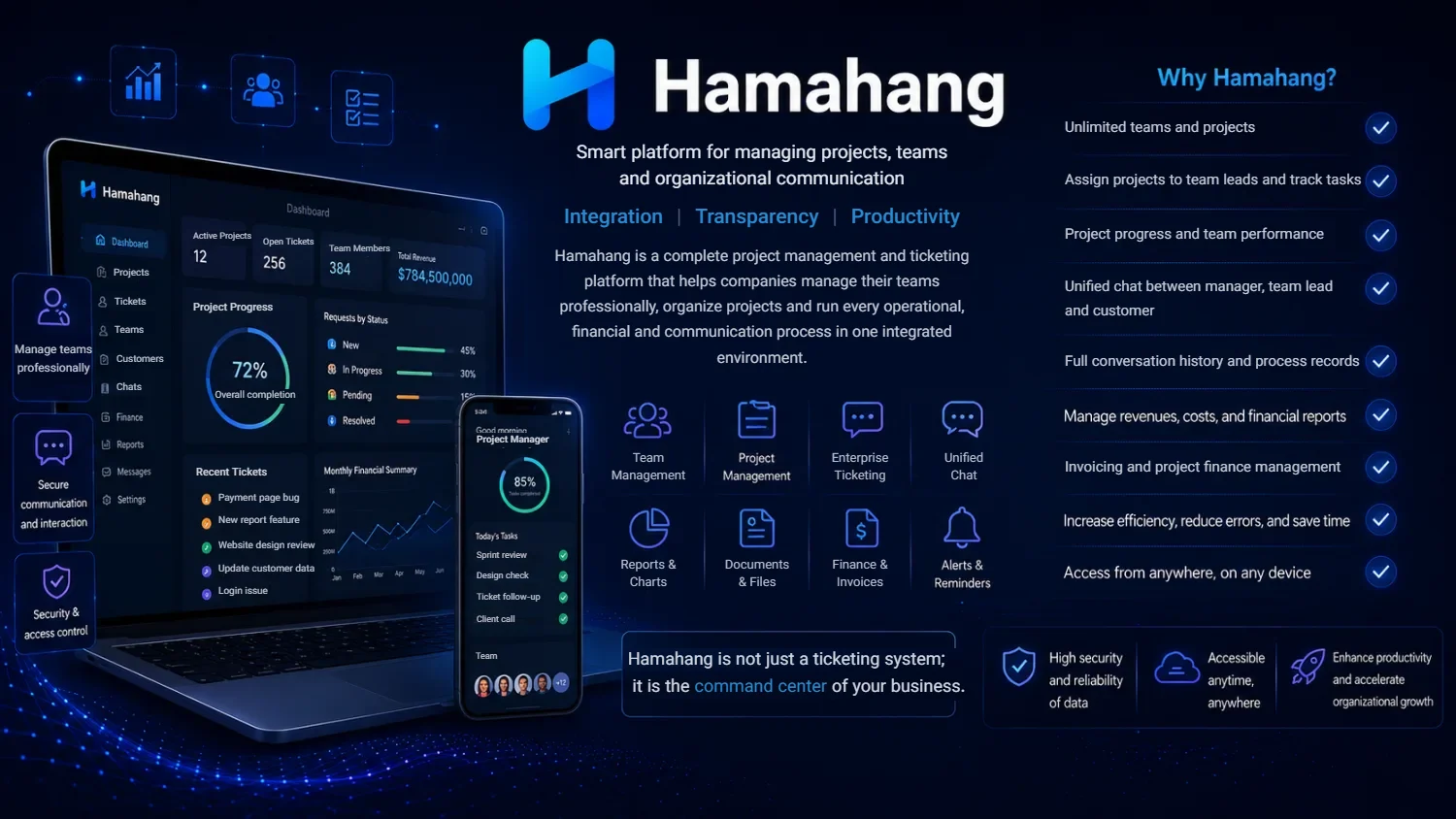
Hamahang is an all-in-one project management ticketing system that unites projects, tickets, internal team messaging and finances in one workspace. Instead of paying for a separate project tool, a help desk and a chat app, your team manages everything — tasks, support tickets and communication — in a single platform.
One Workspace for Projects, Tickets, Chat and Finances
Hamahang brings the tools scattered across your business into one place. Run projects, resolve tickets, message your team and track finances without switching apps or losing context between them.
Help Desk and Ticketing System Built for Team Collaboration
Capture requests as tickets, assign owners, set priorities and track them to resolution. Every ticket lives next to the projects and people it relates to, so nothing falls through the cracks.
Manage Projects and Tasks Without Switching Tools
Plan projects, break them into tasks, assign responsibilities and follow progress with progress reports. Your team sees what matters, what is due and who owns it — all in the same workspace as your tickets.
Built-In Internal Team Messenger
On the Pro and Elite plans, replace scattered chat apps with a messenger built into your work, plus internal calls and meetings. Discuss a ticket or task exactly where it lives, so conversations stay connected to the work instead of lost in a separate tool.
Track Team Finances Alongside Projects and Tickets
Keep project and team finances in the same platform as your work, so budgets and costs stay visible next to the tasks that drive them.
Why Teams Choose Hamahang Over Separate Tools
- Project management and ticketing in one system.
- Team messenger on the Pro and Elite plans — no separate chat app.
- Finances tracked alongside projects and tickets.
- One workspace, one login, one source of truth.
Hamahang at a Glance: Help Desk and Project Management Software in One
Hamahang is a web-based work platform for service teams and SMEs that need to plan projects and answer customer requests in the same place. It runs in the browser and on Android, and you host it either in the cloud or on a server inside your own company. Requests arriving by email or through a form on your website turn into tickets, while tasks, files, conversations and money are tracked next to them.
| Question | Short answer |
|---|---|
| Deployment | Cloud hosting, or on-premise on your own server |
| Platforms | Any modern web browser, plus a mobile app for Android |
| Plans | Three tiers sized by team: Start for teams of up to 15, Pro for up to 50 people and Elite with no user cap; every tier includes everything in the one below it |
| Ticket intake | Email and website forms create tickets automatically; Elite adds a customer portal |
| Team communication | Messenger tied to tasks and tickets, internal calls and meetings (Pro and Elite) |
| Planning views | Calendar and reminders on every plan; Kanban and Gantt boards from Pro |
| Finance | Income, expenses, invoicing, project budgets and costs |
| Moving from old tools | The P-Soft team can migrate your existing data from Excel or previous software; the scope is agreed in your plan or contract |
| Trying it out | A one-to-two-month trial period in real daily work after setup |
Who Uses Ticketing and Project Management Software Like This?
The scenarios below are typical situations, not named clients. They show where a combined tool removes the most friction:
- An IT services firm supporting clients across the Gulf. Support emails from several client companies land in one shared inbox and get lost. With Hamahang each message becomes a ticket with an owner, and larger change requests are moved into a project with tasks and a Gantt timeline.
- A digital or marketing agency juggling many client projects. Account managers need to see deadlines, files and feedback per client. Projects are split into tasks on a Kanban board, and client feedback stays attached to the job it is about rather than buried in a chat group.
- An in-house IT or facilities desk. Colleagues report problems through a web form; the desk prioritises, assigns and closes tickets, and managers read dashboards to see which issues keep coming back.
- A software team shipping releases for customers. Bug reports arrive as tickets, development work is planned as tasks, and the Elite API lets the team connect Hamahang with the other systems it relies on.
How Rolling Out Hamahang Works, Step by Step
- Demo and needs review. You show us how requests and projects flow today, and we suggest the plan that fits your headcount and features.
- Choose where it runs. Cloud if you do not want to maintain a server, or on-premise if your policy requires data to stay on your own infrastructure.
- Setup. Teams, users, projects and the routes that turn your support mailbox and website forms into tickets are configured.
- Data migration. Existing records from spreadsheets or an older tool can be moved across by our team, within the scope agreed for your plan or contract.
- Training and trial. Deployment and training are part of the Elite plan; on every plan you then use Hamahang in real work during the one-to-two-month trial before committing long term.
- Ongoing support. Start includes support and updates, Pro adds priority support, and Elite adds a service level agreement (SLA).
Hamahang Compared With Email, Spreadsheets and a Chat App
Most small teams start with a mailbox, a shared sheet and a messaging app. That combination feels easy at first, but the gaps show once request volume grows and more people share the same customers. Here is how the two approaches compare in daily work:
| Need | Email + spreadsheet + chat group | Hamahang |
|---|---|---|
| Knowing who owns a customer request | Depends on who replied first | Every ticket has a named owner and a status |
| Seeing project progress | Someone updates the sheet by hand | Progress reports on every plan, dashboards from Pro |
| Finding why a decision was made | Scroll through chats and threads | The discussion sits on the task or ticket itself |
| Deadlines and follow-ups | Personal calendars and memory | Shared calendar, reminders and notification automation (Pro) |
| Customer visibility | Customers chase updates by email | Threaded replies; a dedicated customer portal on Elite |
| Budget versus actual cost | A separate accounting file | Project budgets, costs and invoices next to the work |
If your team only needs a to-do list, a heavier platform may be more than you need. Hamahang pays off when support requests, project work and team discussion constantly overlap. For processes that no packaged tool covers, see our custom software development service.
Frequently Asked Questions
What is a project management ticketing system? It is a single tool that combines project and task management with support ticketing, so teams handle work and requests in one place.
Does Hamahang include team chat? Yes. The Pro and Elite plans include a team messenger and internal calls and meetings, so you do not need a separate chat application.
Is Hamahang suitable for small teams? Yes. It fits small teams that want to consolidate projects, tickets and communication, and scales as they grow.
How many users can Hamahang have, and how much does it cost? Hamahang comes in three plans: Start (up to 15 users), Pro (up to 50 users) and Elite (unlimited users), so you start where you are and grow. A one-to-two-month trial is included after setup — contact us for a quote.
Can our customers submit and follow support tickets? Yes. Hamahang includes a help desk: customers open tickets by email or web form — or through the customer portal on the Elite plan — your team replies in a threaded conversation, and both sides see the status until it is resolved.
Does Hamahang integrate with our website and email? Yes. It connects to your website and email so incoming requests become tickets automatically, and the Elite plan adds an API to link Hamahang with the other tools your team already uses.
Is Hamahang cloud-based or on-premise, and which platforms does it run on? You choose cloud or on-premise on your own server. Hamahang is web-based and works in any modern browser, with Android access for teams on the move.
Is Hamahang an alternative to Jira, Trello, Asana or Zendesk? Yes. Hamahang combines project and task management with a customer help desk and a built-in team messenger in one system, so it replaces a stack of separate tools — with cloud or on-premise hosting and no per-tool licensing juggling.
Why use Hamahang instead of running tasks and tickets over email and spreadsheets? Email and spreadsheets scatter requests, hide status and lose history, so things fall through the cracks. Hamahang turns every request into a tracked task or ticket with an owner, status and threaded history, so nothing is forgotten and both your team and your customers can see progress.
Can Hamahang send invoices and track project costs? Yes. Hamahang has a finance area for income and expenses, invoicing, and the budgets and costs of each project. Because these records live in the same workspace as tasks and tickets, a manager can compare what a project was expected to cost with what it actually consumed, without exporting data into a separate spreadsheet or asking the team for a manual status report.
Do I need the Elite plan to get Kanban boards and Gantt charts? No. Kanban and Gantt boards are included from the Pro plan upward, together with the team messenger, internal calls and meetings, dashboards and notification automation. The Start plan focuses on the essentials: project and task management, ticketing, calendar and reminders, files and attachments, progress reports and the mobile app. Elite is needed for the customer portal, custom workflows, organizational access levels and the API.
Can we move our existing tasks and tickets into Hamahang? Yes. When you switch from spreadsheets or another tool, the P-Soft team can migrate your earlier data into Hamahang so you do not start from an empty system. Which records are moved, and how much history comes with them, is defined in your plan or contract, so bring a sample export to the demo and the team can tell you what is realistic.
Request a Demo of Hamahang
See projects, tickets and team messaging in one workspace. Our team replies in English by email and messaging:
- Email: info@p-soft.ir
- WhatsApp: chat with us
- Eitaa: @BarsavoshFanavaran
Related guides
- How to Evaluate Project Management Software in a Trial
- Project Management in Excel vs Dedicated Software
- Ticketing Software for IT Service Companies and MSPs
- Project Management Software for Construction Companies
- Project Management Software for Agencies: Keep Every Client Apart
Complete guide: project management and ticketing software — how to choose
Project Management & Ticketing for European Teams
Hamahang brings project management, a ticketing system and a built-in team messenger together in one web-based workspace, designed for European agencies, distributed departments and service teams. Instead of juggling separate tools for tasks, support requests and internal chat, your colleagues plan work, resolve customer or internal tickets, and talk it through in the same place.
- Project boards and task tracking to keep European teams aligned across time zones
- Ticketing for customer and internal support with clear ownership and status
- Built-in messenger so discussion stays attached to the work it concerns
- One browser-based workspace, no scattered logins to manage
Hamahang is delivered remotely on secure, scalable web architecture, hosting and data-residency can be aligned to your requirements per project, and we support European teams in English. To trial Hamahang for your agency or team, contact us by email or messenger.
Specialised guides
- Enterprise messenger
- Trello, Jira & Asana alternative
- Meetings & action items
- Project cost tracking & invoicing
- Customer portal & web-form tickets
- Self-hosted project management
- Shared team calendar & reminders
- Email & web form to ticket
- Project files & attachments
- Project management for agencies
- Project management for construction companies
- Ticketing for IT service companies
- Excel vs project management software
- How to evaluate during a trial
- Glossary of business software terms
Ready to get started?
Our team will show you a demo built around your own processes and answer your questions.
Request a demoQuestions about this product?
Fill in the form and choose a plan, or message us directly on WhatsApp.
Other products

Data
Your whole factory in one system, from the first inquiry to delivery.
View product →
Avadar
Your warehouse, production and shipments — accurate down to the last item.
View product →
Hamkhoneh
A building that runs itself: service charges, payments and transparent accounts.
View product →
Zaran
Precise gold shop accounting and a live rate board for your customers.
View product →
Nooradio
Every entry and exit under your watch; live and uninterrupted.
View product →Related articles
How to Evaluate Project Management Software in a Trial
How to evaluate project management software during a trial: prepare real work, run four test stages, score each…
Read article →Project Management in Excel vs Dedicated Software
Project management in Excel vs dedicated software: where spreadsheets still win, the signs your tracker is breaking, a…
Read article →Ticketing Software for IT Service Companies and MSPs
Ticketing software for IT service companies has to keep dozens of client firms apart and track each contract's…
Read article →