Project Management Software and Ticketing System: A Complete Guide
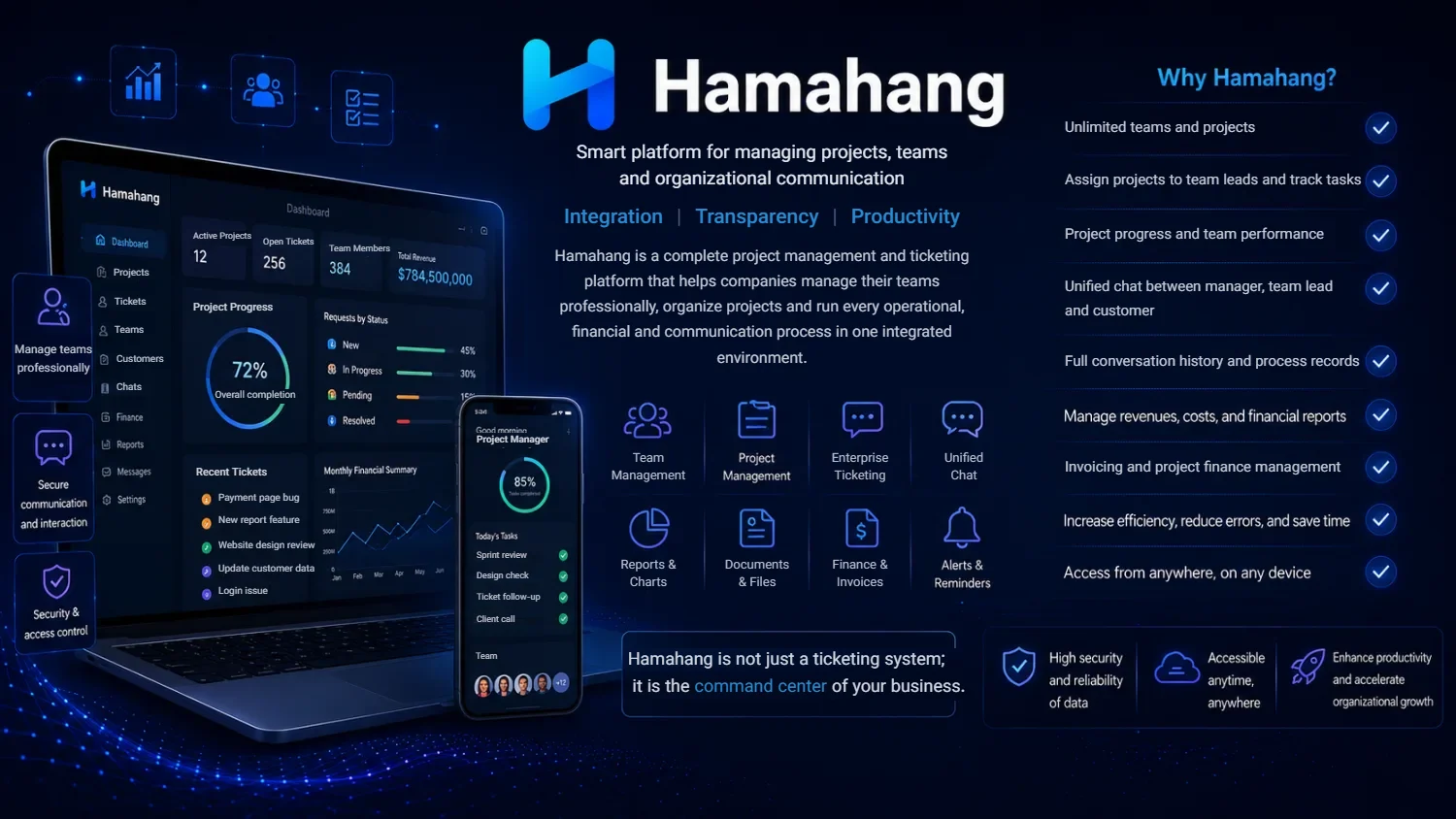
Project management software is a tool that helps teams plan work, assign tasks, track progress, and deliver projects on time in one shared workspace. When it is paired with a ticketing system, the same platform can also capture support requests, questions, and issues from customers or colleagues, route them to the right person, and keep a permanent record of every reply. Together, project management software and a ticketing system move a team away from scattered chats and forgotten promises toward accountable, measurable work. This guide explains what each system does, how they differ, the features that matter, and how to choose the right approach for an international team.
What Is Project Management Software?
Project management software is a digital workspace where a team defines what needs to be done and coordinates who does it. At its core it organizes work into projects, breaks projects into tasks, and gives each task an owner, a deadline, and a status. Instead of tracking commitments in someone’s head or across a dozen email threads, everything lives in a single system that the whole team can see.
Good task management software does more than list to-dos. It shows how work flows from “not started” to “in progress” to “done,” highlights what is overdue, and reveals where a project is blocked. Managers get a real picture of capacity and timelines, while individual contributors know exactly what is expected of them today. This visibility is the difference between a team that reacts to fires and a team that plans ahead. If you want a deeper primer, see our explainer on what project management software is.
What Is a Ticketing System and How Does It Differ?
A ticketing system is software that turns every incoming request, whether a customer complaint, a bug report, or an internal question, into a trackable unit called a ticket. Each ticket carries the requester’s details, the description of the problem, its priority, its status, and the full conversation history until it is resolved. This is the foundation of help desk software and modern customer support software.
The difference from project management software is one of intent. Project management is about planned, proactive work that a team decides to do: shipping a feature, launching a campaign, onboarding a client. A ticketing system handles reactive work that arrives unpredictably from outside: a user cannot log in, a payment failed, a document is missing. Project tasks are usually created by the team; tickets are usually created by requests coming in. The best platforms unify both, because most teams do planned and reactive work side by side. Our guide on what a ticketing system is covers this in more detail, and we compare the two directly in ticketing versus project management.
Essential Features of a Good PM + Ticketing Tool
When project management and issue tracking live in one platform, a handful of features separate a genuinely useful tool from a glorified list. Look for the following:
- Projects and tasks: the ability to group related work into projects and split each into clear, ownable tasks with deadlines.
- Assignment and tracking: every task and ticket has a named owner and a live status, so nothing sits in limbo.
- Support ticket management: incoming requests become structured tickets that can be categorized, prioritized, and routed to the right team.
- SLA and response time: service-level agreements set expected first-response and resolution times, and the system flags anything at risk of breaching them.
- Notifications: the right people are alerted when they are assigned work, mentioned, or when a deadline approaches, without drowning everyone in noise.
- Progress reports: automatic reporting on completed tasks, open tickets, and throughput, so status is a fact rather than a guess.
- Management dashboard: a single view of workload, bottlenecks, and performance across projects and support queues.
- Access levels: role-based permissions so people see and change only what their job requires.
- Correspondence archive: a permanent, searchable record of every message and decision attached to its task or ticket.
- Team messenger: built-in messaging so quick conversations stay connected to the work instead of leaking into external chat apps.
Why Messengers (Telegram/WhatsApp) Don’t Replace a Ticketing System
Many teams start by managing work and support inside Telegram or WhatsApp groups because they are free and familiar. It works until it doesn’t, and the failure is predictable. The first problem is lost history: a critical decision from three weeks ago is buried under thousands of unrelated messages, and no one can find it when it matters.
The second is no accountability. A message sent to a group belongs to everyone and therefore to no one. When a request has no owner and no status, it is easy for it to be seen, assumed handled by someone else, and quietly dropped. Third, there is no SLA: a chat app cannot tell you which requests are overdue or which customer has been waiting too long. Fourth, there is no reporting. You cannot measure how many issues you resolved this month or how long they took, so you cannot improve. Finally, there is no access control: everyone in the group sees everything, which is a real privacy and security risk when customer data is involved. Messengers are excellent for casual conversation, but they were never built to run accountable work or customer support.
Comparing Team-Work and Support Approaches
To make the trade-offs concrete, here is an honest comparison of three common approaches: a messenger group, spreadsheets or paper, and a dedicated project management plus ticketing tool.
| Capability | Messenger (Telegram/WhatsApp) | Spreadsheet / Paper | Dedicated PM + Ticketing Tool |
|---|---|---|---|
| Task tracking | Manual and easily lost | Possible but not live | Built-in with live status |
| Accountability | Weak; no clear owner | Depends on discipline | Every item has an owner |
| History / archive | Buried in chat scroll | Scattered across files | Searchable and permanent |
| SLA | None | None | Enforced and monitored |
| Reporting | None | Manual and slow | Automatic dashboards |
| Access levels | All-or-nothing | Hard to control | Role-based permissions |
Spreadsheets are a step up from chat because they at least record data, but they do not update in real time, they do not notify anyone, and they break down as soon as several people need to edit at once. A dedicated tool is the only option that holds up as a team grows.
Who Is It For?
A combined project management and ticketing platform earns its place in several types of organization. Customer support teams use it to capture every request as a ticket, meet response-time commitments, and never lose a conversation. Technical and software teams rely on it for issue tracking, connecting bug reports directly to the tasks that fix them. Service companies, from agencies to maintenance providers, use it to manage client requests and internal delivery in the same place. And organizations pursuing office automation adopt it to route requests, approvals, and internal work digitally instead of on paper. If office automation is your goal, our overview of office automation software is a useful companion read.
How to Choose
Choosing the right platform is less about the longest feature list and more about fit. Weigh these factors before you commit:
- Integration: the tool should connect the planned work of your team with incoming support requests, and ideally include messaging, so you are not stitching together separate apps.
- Ease of use: if the interface is confusing, people quietly abandon it and drift back to chat. Adoption is everything.
- Web-based access: a browser-based system works on any device, anywhere, with nothing to install and central updates.
- Scalability: it should stay responsive and organized whether you have five users or five hundred, and grow with new teams and projects.
- Security: role-based access, a protected archive, and sensible data handling matter especially when customer information is involved.
Test any candidate with a real project and a real support queue before rolling it out. A short trial with your own work reveals far more than any brochure.
Meet Hamahang (Project Management, Ticketing & Team Messenger)
Hamahang is a web-based platform that brings project management, a ticketing system, and an enterprise team messenger (Pro and Elite plans) together in one place. Instead of running tasks in one app, support tickets in another, and conversations in a chat group, a team manages all three inside a single system where the work, the requests, and the discussion stay connected. Projects and tasks get owners and deadlines; incoming requests become trackable tickets with an owner and a status; and the team messenger keeps quick communication tied to the work rather than scattered across external apps.
Because it is web-based, Hamahang runs in the browser with no installation; it gives each user separate roles and permissions, with organizational access levels on the Elite plan, and its permanent correspondence archive is designed for teams that need accountability and a real record of what happened. To see how the unified approach works in practice, visit the Hamahang project management and ticketing page. It is best suited to support teams, technical teams, and service organizations that have outgrown chat groups and spreadsheets and want one honest source of truth.
Frequently Asked Questions
What is the difference between project management software and a ticketing system?
Project management software organizes planned work that the team decides to do, breaking projects into tasks with owners and deadlines. A ticketing system captures reactive requests that arrive from outside, such as customer questions or bug reports, and tracks each as a ticket until it is resolved. Many teams need both, which is why unified platforms exist.
What is a ticketing system?
A ticketing system is software that turns each incoming request into a structured ticket with a requester, a priority, a status, and a full conversation history. It is the backbone of help desk and customer support software because it ensures no request is lost and every response is recorded.
Is this kind of software free?
Some tools offer free or trial tiers with limited users or features, which can be enough for a very small team to get started. Most organizations, however, need paid plans for the reporting, SLA management, access control, and scale that real support and project work require. Judge the value by the time saved and the requests no longer dropped, not by price alone.
How much does it cost?
Pricing varies widely by platform, number of users, and the features included, so there is no single figure that applies to every product. The honest way to compare is to match your team size and the capabilities you actually need against each vendor’s plans, and to trial the tool before committing.
Is it web-based?
Modern platforms, including Hamahang, are web-based, meaning they run in a browser on any device with nothing to install and updates handled centrally. This makes access easy for distributed and international teams and keeps everyone on the same version.
Is it suitable for support teams?
Yes. Support teams are among the biggest beneficiaries, because a ticketing system with SLA tracking, notifications, and a searchable archive is exactly what customer support needs to respond on time and never lose a conversation.
Can one tool handle both project work and support?
Yes, and that is the point of a unified platform. When project management, issue tracking, and ticketing share one system, a bug report can flow straight into the task that fixes it, and managers see planned work and incoming requests in the same dashboard rather than in disconnected tools.
If your team is ready to move beyond scattered chats and spreadsheets, explore how one platform can unite project management, ticketing, and team messaging on the Hamahang project management and ticketing page and start running accountable, measurable work today.
